

Arabic currency conversion from numbers to letters
Posted in SQL 0 comments
Original Post on CodeProject

Introduction
This project can be useful in many applications, like ERPs, financial applications, or any application used by Arabic speakers to display any number "as digits to characters", which is called - in some Arab countries - "tafqit" or "تفقيط".
Background
It's known that to write a number in Arabic characters, it's a little bit hard, as a number like 123 is written in English as "One Hundred twenty three", but in Arabic, it will be "One Hundred and three and twenty". So, for a big number - say 7 digits - it will be a little bit confusing to write it in this complicated form.
Using the code
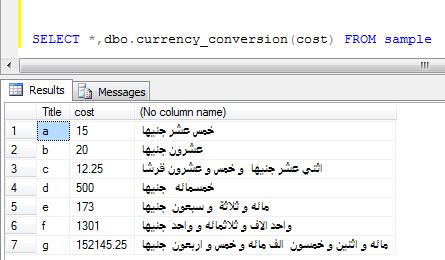
The advantage of this code that it's pure SQL , so it will be easy to add it to any function, Stored Procedure, or View. Also, it can be used in both web and Windows applications. To use the code, first run the attached script in the desired database and then use the function called
In the last example, the output will be:
Points of interest
As I mentioned before, this function can be used in both Windows and web applications as it is just a SQL function. Also, as it's a scalar function, it can be used in both Views and Stored Procedures. You can also modify the script to fit your country's currency; just replace "Egyptian Pound" with your currency
Finally, to download the script, click HERE
The script contains the required table and functions, run it on any database (good or new) and then you can use the function mentioned before (SELECT dbo.currency_conversion(@number))
I hope this is useful.
Introduction
This project can be useful in many applications, like ERPs, financial applications, or any application used by Arabic speakers to display any number "as digits to characters", which is called - in some Arab countries - "tafqit" or "تفقيط".
Background
It's known that to write a number in Arabic characters, it's a little bit hard, as a number like 123 is written in English as "One Hundred twenty three", but in Arabic, it will be "One Hundred and three and twenty". So, for a big number - say 7 digits - it will be a little bit confusing to write it in this complicated form.
Using the code
The advantage of this code that it's pure SQL , so it will be easy to add it to any function, Stored Procedure, or View. Also, it can be used in both web and Windows applications. To use the code, first run the attached script in the desired database and then use the function called
currency_conversion like this:SELECT dbo.currency_conversion(12.10)
In the last example, the output will be:
currency
------------------------------------------
اثني عشر جنيها  و عشره قرشا

(1 row(s) affected)
Points of interest
As I mentioned before, this function can be used in both Windows and web applications as it is just a SQL function. Also, as it's a scalar function, it can be used in both Views and Stored Procedures. You can also modify the script to fit your country's currency; just replace "Egyptian Pound" with your currency
Finally, to download the script, click HERE
The script contains the required table and functions, run it on any database (good or new) and then you can use the function mentioned before (SELECT dbo.currency_conversion(@number))
I hope this is useful.


